Skip to content

Add CDPlayer - #11083

Merged
probonopd merged 1 commit into
masterfrom
discover/CDPlayer
Nov 11, 2026
Merged

probonopd merged 1 commit into
masterfrom
discover/CDPlayer

Conversation

@probonopd

Copy link
Copy Markdown
Member

Repository: https://github.com/Kizarov3/CDPlayer

A desktop music player that feels like a real CD player — for your local music, audio CDs and Spotify. Spinning disc, CD shelf, lyrics & karaoke, lossless/hi-res playback, spatial audio for headphones, CD ripping to FLAC. macOS, Windows, Linux.

  • Stars: 8
  • Release with the AppImage: v2.20.1 (2026-10-27T21:20:20Z)
  • AppImage asset: CDPlayer-2.20.1-linux.AppImage
  • License: MIT

Found by .github/workflows/discover-apps.yml, which looks for GitHub
repositories that publish AppImages but are not in the catalog yet. This
entry was not tested by a human; please review it before merging.

Discovered on GitHub as publishing AppImages on its releases, by
discover-apps.yml. Needs a maintainer's review.
@github-actions

Copy link
Copy Markdown
Contributor

✅ Test passed

@Kizarov3: this pull request adds the AppImage from your GitHub repository to the AppImage catalog; the test reports the following. Could you have a look?

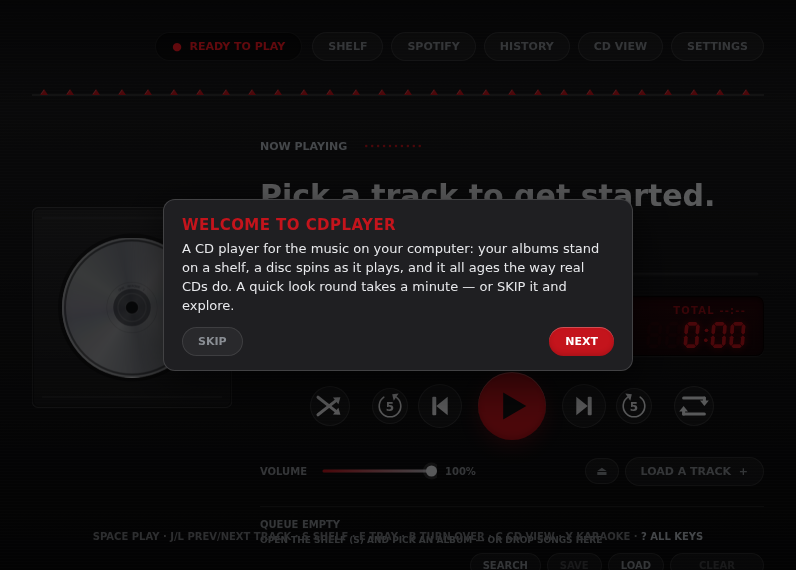
Please check that the screenshot shows the application's main window.

CDPlayer

CDPlayer

Tested:

Compatibility: not self-contained: uses the C library of the system; uses an old AppImage runtime that needs the C library (and libfuse2) of the system; references glibc 2.25

Names:

WARNING: AppImage name 'CDPlayer-2.20.1-linux.AppImage': should not contain 'Linux', since all AppImages are for Linux (e.g. 'App-1.0-x86_64.AppImage', not 'App-1.0-linux-x86_64.AppImage')

Warnings:

  • Please check the remarks about the names below.
  • The window is mostly dark, so the application seems to start in a dark theme although the test system is not set to dark mode. Please use a light mode by default and use the dark theme only when the system is configured for dark mode (e.g. the GTK/Qt or theme setting) or the user chooses it in the settings.
  • The AppImage contains no update information, so users cannot update it with AppImageUpdate or similar tools. Please consider embedding it when building the AppImage (e.g., appimagetool -u) and publishing the .zsync file next to the AppImage; see https://docs.appimage.org/packaging-guide/optional/updates.html

Commit e7a4c20. Full log

@Kizarov3

Kizarov3 commented Nov 10, 2026 •

Copy link
Copy Markdown

Hi! I'm the author of CDPlayer. The screenshot shows CDPlayer's main window as intended.

About the "mostly dark" warning: I know the README asks for a light default, with exceptions e.g. for games. I'd like to ask for one here: the dark look is the design, not a theme. CDPlayer is drawn as a physical CD player, a black deck with a display, a tray and the disc. None of its looks (CLASSIC, HIFI, TERMINAL and the rest) has a light version, so a light default would mean redesigning the app rather than switching a theme.

Since that warning is the only thing keeping the 'screenshot-ok' label off, could you take a look and merge it by hand? Thanks!

@probonopd probonopd added the screenshot-ok Test passed; the screenshot was checked and looks fine label Nov 11, 2026
@probonopd
probonopd merged commit 00ab87e into master Nov 11, 2026
3 checks passed
@probonopd
probonopd deleted the discover/CDPlayer branch November 11, 2026 00:24
@probonopd

Copy link
Copy Markdown
Member Author

Thanks @Kizarov3

Sign up for free to join this conversation on GitHub. Already have an account? Sign in to comment

Labels

auto-discovered screenshot-ok Test passed; the screenshot was checked and looks fine

Projects

None yet

Development

Successfully merging this pull request may close these issues.

2 participants