


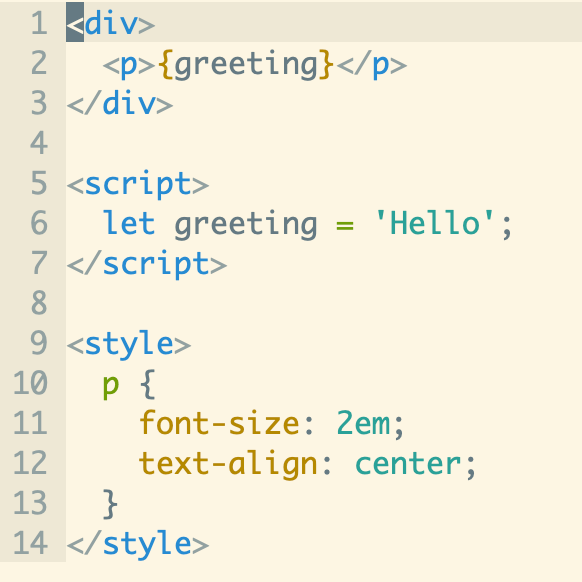
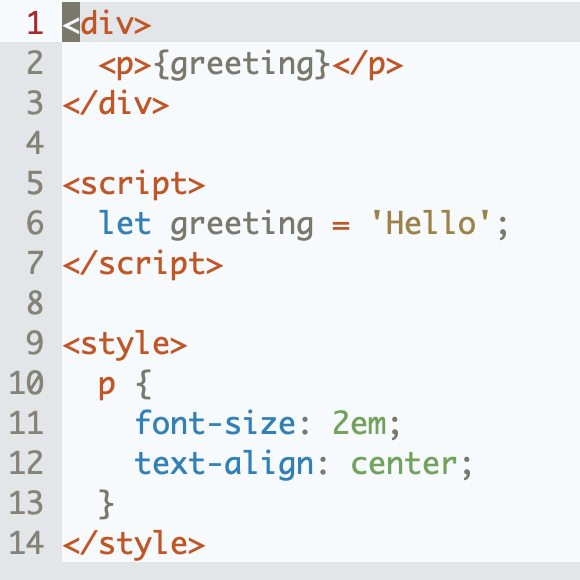
Vim syntax and indent plugin for .svelte files. Forked from vim-vue-plugin.
How to install
-
Plugin 'leafOfTree/vim-svelte-plugin' -
cd ~/.vim/bundle && \ git clone https://github.com/leafOfTree/vim-svelte-plugin --depth 1 -
Plug 'leafOfTree/vim-svelte-plugin' :PlugInstall -
Or manually, clone this plugin to
path/to/this_plugin, and add it tortpin vimrcset rtp+=path/to/this_plugin
The filetype is set to svelte for .svelte files. It's tested with Vim 8.2+ and Neovim 0.9+. Feel free to open an issue or pull request.
See :help vim-svelte-plugin for the documentation in Vim.
It combines HTML, CSS and JavaScript syntax and indent in one file.
Supports
-
Svelte syntax: directives like
on:clickandbind:value, blocks like{#if},{#each},{#await}and Svelte 5{#snippet}, and tags like{@html},{@render}and{@const}. -
Blocks with any syntax by
lang="...", like TypeScript, Less/Sass/Scss, Stylus, Pug with vim-pug and Coffee with vim-coffee-script.^Relative plugins need to be installed if not provided by Vim.
-
A builtin
foldexprfoldmethod.^ -
Functions to get the current tag or syntax, see Context based behavior.
-
emmet-vim HTML/CSS/JavaScript filetype detection.
^: see Configuration for details.
g:vim_svelte_plugin_config is the recommended configuration. Its default value is below, which you can copy as a starting point
let g:vim_svelte_plugin_config = {
      \ 'syntax': {
      \   'script': ['javascript'],
      \   'style': ['css'],
      \   'template': [],
      \ },
      \ 'full_syntax': ['pug', 'coffee', 'typescript'],
      \ 'initial_indent': ['script', 'style'],
      \ 'attribute': 0,
      \ 'foldexpr': 0,
      \ 'open_devdocs': '<F1>',
      \ 'debug': 0,
\ }- syntax: syntax of
<script>,<style>and<template lang="...">blocks- key:
script,styleortemplate. Others are ignored, as markup outside<script>and<style>is always the svelte template - value: string list. Syntax for the block
lang="..."on the block tag decides the syntax, in double or single quotes or without quotes.typescriptmatcheslang="ts"andlang="typescript",sassmatcheslang="sass"and SugarSSlang="sss"- Without
lang="...", or if it's not in the list, the first syntax is used.<script lang="ts">is highlighted and indented as the first syntax ofscriptiftypescriptis not in the list - Syntax plugins need to be installed if not provided by Vim, like vim-pug, vim-coffee-script, typescript-vim or yats.vim
- Each key replaces the default of the same key, so
{'syntax': {'script': ['javascript', 'typescript']}}keepsstyleas['css']
- key:
- full_syntax: string list. Syntax whose files are loaded from all of
runtimepath, including plugins. Others are loaded only from$VIMRUNTIME/syntax,~/.vim/syntaxand$VIM/vimfiles/syntax, or from all ofruntimepathif not found there* - initial_indent: string list. Block tag, syntax or
tag.syntaxlikestyle.scssto indent one level initially - attribute: Highlight the key of svelte attributes like
on:clickandbind:valueasType, and their value{...}as normal text instead of string - foldexpr: Enable builtin
foldexprfoldmethod - open_devdocs: Key mapping to search documentation on https://devdocs.io for the word under the cursor or selected.
''to disable it - debug: Echo debug messages in
messageslist. Useful to debug if unexpected indents occur
For 0/1 options, set 1 to enable or 0 to disable. Example:
let g:vim_svelte_plugin_config = {
      \ 'syntax': {
      \   'script': ['javascript', 'typescript'],
      \   'style': ['css', 'scss', 'sass'],
      \ },
      \ 'foldexpr': 1,
      \ }
*: Vim may be slow when loading many syntax files. Find a balance between syntax highlight and speed. By the way, custom syntax can be added in ~/.vim/syntax or $VIM/vimfiles/syntax.
Previous variables
Variables below still work. They decide the default of g:vim_svelte_plugin_config, whose options take precedence over them.
| variable | same as in g:vim_svelte_plugin_config |
|---|---|
| g:vim_svelte_plugin_load_full_syntax | full_syntax with html, css, javascript, less, sass and stylus |
| g:vim_svelte_plugin_use_pug | pug in syntax.template |
| g:vim_svelte_plugin_use_coffee | coffee in syntax.script |
| g:vim_svelte_plugin_use_typescript | typescript in syntax.script |
| g:vim_svelte_plugin_use_less | less in syntax.style |
| g:vim_svelte_plugin_use_sass | scss and sass in syntax.style |
| g:vim_svelte_plugin_use_stylus | stylus in syntax.style |
| g:vim_svelte_plugin_has_init_indent | initial_indent as ['script', 'style'], or [] if 0 |
| g:vim_svelte_plugin_use_foldexpr | foldexpr |
| g:vim_svelte_plugin_debug | debug |
| g:vim_svelte_plugin_highlight_svelte_attr | attribute |
| g:vim_svelte_plugin_open_devdocs | open_devdocs |
Note
filetypeis set tosvelteso autocmds and other custom settings forjavascripthave to be manually enabled forsvelte.- See https://svelte.dev/docs/svelte/svelte-compiler#preprocess for how to use
Less/Sass/Pug... in svelte.
Neovim & Treesitter
For css syntax highlighting you will need the css language parser for Treesitter. You can install it like so:
:TSInstall css
As there are more than one language in .svelte file, the different behaviors like mapping, completion, and local options may be expected according to tags or subtypes(current language type).
This plugin provides functions to get the tag/subtype where the cursor is in.
-
GetSvelteTag([lnum]) => String: Return value is one of
'template', 'script', 'style', or'', at linelnumor the cursor line." Example autocmd FileType svelte inoremap <buffer><expr> : InsertColon() function! InsertColon() let tag = GetSvelteTag() return tag == 'template' ? ':' : ': ' endfunction
-
GetSvelteSubtype() => String: Return value is one of
'html', 'javascript', 'css', 'scss', .... -
OnChangeSvelteSubtype(subtype): An event listener that is called when subtype changes.
You can also define an event listener function
OnChangeSvelteSubtype(subtype)in yourvimrcto get the subtype and set its local options whenever it changes." Example: set local options based on subtype function! OnChangeSvelteSubtype(subtype) echom 'Subtype is '.a:subtype if empty(a:subtype) || a:subtype == 'html' setlocal commentstring=<!--%s--> setlocal comments=s:<!--,m:\ \ \ \ ,e:--> elseif a:subtype =~ 'css' setlocal comments=s1:/*,mb:*,ex:*/ commentstring& else setlocal commentstring=//%s setlocal comments=sO:*\ -,mO:*\ \ ,exO:*/,s1:/*,mb:*,ex:*/,:// endif endfunction
Currently emmet-vim works regarding your HTML/CSS/JavaScript emmet settings, but it depends on how emmet-vim gets filetype and may change in the future. Feel free to report an issue if any problem appears.
Since there are many sub languages included, most delays come from syntax files overload. A variable named b:current_loading_main_syntax is set to svelte which can be used as loading condition if you'd like to manually find and modify the syntax files causing overload.
For example, the builtin syntax sass.vim and less.vim in Vim runtime always load css.vim which this plugin already loads. It can be optimized like
- runtime! syntax/css.vim
+ if !exists("b:current_loading_main_syntax")
+   runtime! syntax/css.vim
+ endifRun tests with Vim and Neovim, whichever is installed
./test/run.sh
./test/run.sh basic template  # Only these cases
SVELTE_TEST_EDITORS=nvim ./test/run.sh  # Only Neovim
./test/shared.sh  # Compare shared-* cases with vim-vue-plugin
Each case is a .svelte file in test/cases, with an optional .vim file for the config and checks. A case fails if
- indenting the whole file changes it
- with
g:test_flatten, indenting the file after removing all indent doesn't restore it - a check in
Check()fails, such as syntax,GetSvelteTag(),GetSvelteSubtype()or fold level - there is an error message
Tests also run on GitHub Actions for each push and pull request, with Vim 8.2.0000, the latest Vim, Neovim 0.9.5 and the latest Neovim.
Cases named shared-* are for scenarios also in vim-vue-plugin, which handles blocks in the same way. ./test/shared.sh lists shared cases in only one of them, as a warning on GitHub Actions, so a fix in one plugin can be checked in the other.
- vim-svelte-theme svelte syntax color
- vim-vue-plugin
- mxw/vim-jsx
This plugin is under The Unlicense. Other than this, indent/svelte-xml.vim and indent/svelte-css.vim are extracted from vim runtime.