




This repo for documenting Tableau Public's API and details of its various API calls.
Twitter 💬 | LinkedIn 👔 | GitHub  | Website 🔗
Tableau Public is the free version of Tableau's Desktop product, it allows for the creation and distribution of Tableau dashboards. The Tableau Public platform has an API for handling data relating to user profiles and workbooks (dashboards). This API can be accessed via a web browser or a programming language (R, Python, JavaScript).
Thanks to Jeffrey Shaffer's blog post & Marc Reid's blog post for sharing this information that acting as the starting point for this documentation.
Last checked: 2026-11-08 14:43 UTC
| API Endpoint | Status | API Endpoint | Status |
|---|---|---|---|
| Author Profile | ✅ Operational | Workbook Lineage | ✅ Operational |
| Profile (Legacy) | ✅ Operational | Hall of Fame Visionaries | ✅ Operational |
| Profile Categories | ✅ Operational | Tableau Visionaries | ✅ Operational |
| Workbooks | ✅ Operational | Tableau Ambassadors NA | ✅ Operational |
| Followers | ✅ Operational | VOTD Dashboards | ✅ Operational |
| Following | ✅ Operational | Search Workbooks | ✅ Operational |
| Favourites | ✅ Operational | Search Authors | ✅ Operational |
| Workbook Image | ✅ Operational | Search Data Sources | ✅ Operational |
| Workbook Thumbnail | ✅ Operational | Search Result Counts | ✅ Operational |
| Workbook Details | ✅ Operational | Trending Vizzes | ✅ Operational |
| Workbook Contents | ✅ Operational | Author Profile Card | ✅ Operational |
| Related Workbooks | ✅ Operational | Download Workbook | ✅ Operational |
- 2019-03-10, Jeffrey Shaffer's Using the Tableau Public API in 3 Easy Steps
- 2019-05-13, Mark Reid's Tableau Public API blog post
- 2020-08-24, Will Sutton's Assembling a Gallery of Iron Viz Submissions
- 2020-10-31, Annabelle Rincon's Landing Page for Tableau Public
- 2021-01-21, Curtis Harris Sending Tableau VOTD as a Slack Message
- 2021-05-16, Priyanka Dobhal's Design Your Tableau Portfolio
- Ken Flerage’s Tableau Public Stats Service
- Josh Tapley’s Cerebro Project, an overview of all Tableau Public Users Stats
- Nir Smilga’s Tableau Public Explorer, an alternative view built from Josh Tapley’s Cerebro Project
- Andre de Vries’ Web data connector for Tableau Public
- Jessica Moon's 2022 Iron Viz Qualifier Entries
- Jessica Moon's 2023 Iron Viz Qualifier Entries
- Tableau Public's Viz of the Day : Google Sheets
- Python/example_profile_call.py - get a user's profile, websites and workbooks
- Python/search_example.py - search for workbooks
- Python/get_votd_data.py - get every Viz of the Day
- Python/get_featured_authors.py - get Tableau Visionaries, their workbooks and VOTDs
- Python/build_profile_gallery.py - build an HTML gallery page of a user's vizzes
- Python/tableau_public_sign_in.py - sign in and use the signed-in API calls
- R/functions - R functions for profiles, workbooks, VOTDs, favourites and viz images
API call output
Retrieve a Tableau Public author's full profile as a JSON: profile counts (visible workbooks, followers, following), bio, organisation, pronouns, social/website links, and profile settings (e.g. freelance / "hire me"). In addition this newer call returns an achievements array covering the author's Tableau Public recognitions. This is intended as the replacement for the legacy Profile call.
The achievements array contains one entry per achievement type, each with an achievementType, a total, and either a years array or a workbooks array:
- VOTD — Viz of the Day wins, as workbooks of { votdDateEpochMillis, workbookRepoUrl }
- VISIONARY — years recognised as a Tableau Visionary
- AMBASSADOR — years recognised as a Tableau Ambassador
- IRON_VIZ_WINNER — Iron Viz championship wins, as workbooks of { year, workbookRepoUrl }
- IRON_VIZ_FINALIST — Iron Viz finals appearances, as workbooks of { year, workbookRepoUrl }
API call format
https://public.tableau.com/public/apis/bff/v1/author-profile/ + Tableau Public Username
Example API call
https://public.tableau.com/public/apis/bff/v1/author-profile/wjsutton
Legacy: superseded by Author Profile. Still functional but expected to be deactivated by Tableau Public in the future.
API call output
Retrieve basic counts of workbooks, followers, following, favourites, details of websites, whether they have the "hire me" button on their profile (freelance), social media links, bio and banner details associated to a Tableau Public username. Returned as a JSON.
Note workbooks are no longer included in this call, use Workbooks instead.
API call format
https://public.tableau.com/profile/api/ + Tableau Public Username
Example API call
https://public.tableau.com/profile/api/wjsutton
Note a basic user profile description query is available via:
https://public.tableau.com/public/apis/authors?profileName=wjsutton
Discovered by Jacob Rothemund
API call output
Retrieve details of a user's workbook categories. This includes the category names, the workbooks contained within the categories, with basic details about the workbooks with views and favourites. Returned as a JSON.
API call format
https://public.tableau.com/public/apis/bff/v2/author/ + Tableau Public Username + /categories?startIndex=0&pageSize=500
Example API call
https://public.tableau.com/public/apis/bff/v2/author/jacob.rothemund/categories?startIndex=0&pageSize=500
Note that the next 500 categories can be retrieved by changing the startIndex section to startIndex=1.
API call output
Retrieves details of the last 50 workbooks associated to a Tableau Public username. Returned as a JSON.
Note that the next 50 workbooks can be retrieved by changing the start section to start=50 or start=100, start=150, etc.
In Feb 2023 a visibility parameter has been added,'&visibility=NON_HIDDEN' which will only allow the API to reach visible workbooks on a user's profile.
API call format
First 50 workbooks: https://public.tableau.com/public/apis/workbooks?profileName= + Tableau Public Username + &start=0&count=50&visibility=NON_HIDDEN
Next 50 workbooks: https://public.tableau.com/public/apis/workbooks?profileName= + Tableau Public Username + &start=50&count=50&visibility=NON_HIDDEN
Example API call
https://public.tableau.com/public/apis/workbooks?profileName=wjsutton&start=0&count=50&visibility=NON_HIDDEN
API call output
Retrieves a list of followers for a Tableau Public User, returns usernames, user metadata, details of their latest workbook. Note that the count of accounts appears to be now limited to 24 per call, i.e. count=24 will return up to 24 accounts, count=24&index=24 will return the next 24 accounts.
API call format
Get 24 followers: https://public.tableau.com/profile/api/followers/ + Tableau Public Username + ?count=24&index=0
Get next 24 followers: https://public.tableau.com/profile/api/followers/ + Tableau Public Username + ?count=24&index=24
Example API call
https://public.tableau.com/profile/api/followers/wjsutton?count=24&index=0
API call output
Retrieves a list of accounts being followed by a Tableau Public User, returns usernames, user metadata, details of their latest workbook. Note that the count of accounts appears to be now limited to 24 per call, i.e. count=24 will return up to 24 accounts, count=24&index=24 will return the next 24 accounts.
API call format
Get 24 following: https://public.tableau.com/profile/api/following/ + Tableau Public Username + ?count=24&index=0
Get next 24 following: https://public.tableau.com/profile/api/following/ + Tableau Public Username + ?count=24&index=24
Example API call
https://public.tableau.com/profile/api/following/wjsutton?count=24&index=0
API call output
Returns a list of workbookRepoUrls favourited by a Tableau Public User, in JSON format.
API call format
https://public.tableau.com/profile/api/favorite/ + Tableau Public Username + /workbook?
Example API call
https://public.tableau.com/profile/api/favorite/wjsutton/workbook?
API call output
Returns a screenshot image of the entire dashboard.
UPDATE
Thanks to Kelly Gilbert there is a more reliable API call for a fullscreen image.
"https://public.tableau.com/views/WORKBOOKNAME/VIEWNAME.png?%3Adisplay_static_image=y&:showVizHome=n"

API call format
https://public.tableau.com/views/+ Workbook Repo Url + / + Default View Name (Excluding spaces & fullstops) + .png?%3Adisplay_static_image=y&:showVizHome=n
OLD Version: https://public.tableau.com/static/images/ + First 2 Letters of Workbook Repo Url + / + Workbook Repo Url + / + Default View Name (Excluding spaces & fullstops) + /1.png
Example API call
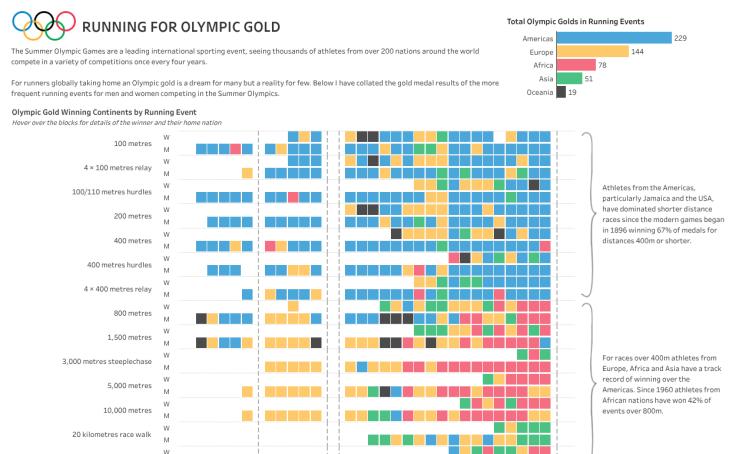
https://public.tableau.com/views/RunningforOlympicGold/RunningforOlympicGold.png?%3Adisplay_static_image=y&:showVizHome=n
OLD Version:https://public.tableau.com/static/images/Ru/RunningforOlympicGold/RunningforOlympicGold/1.png


API call output
Returns a thumbnail-sized image, typically found on a Tableau Public author's page. Note there are two different calls to produce a thumbnail image.
API call format
https://public.tableau.com/thumb/views/ + Workbook Repo Url + / + Default View Name (Excluding spaces & fullstops)
Alternative Call:
https://public.tableau.com/static/images/ + First 2 Letters of Workbook Repo Url + / + Workbook Repo Url + / + Default View Name (Excluding spaces & fullstops) + /4_3.png
Example API call
https://public.tableau.com/thumb/views/RunningforOlympicGold/RunningforOlympicGold
Alternative Call: https://public.tableau.com/static/images/Ru/RunningforOlympicGold/RunningforOlympicGold/4_3.png
API call output
Returns a details of a single workbook based on WorkbookRepoUrl, used in the favourites section of the Tableau Public profile to look up details of a workbook e.g. views, titles, etc.
API call format
https://public.tableau.com/profile/api/single_workbook/ + Workbook Repo Url + ?
Example API call
https://public.tableau.com/profile/api/single_workbook/RunningforOlympicGold?
API call output
Returns details of a single workbook based on WorkbookRepoUrl, returns some metadata about the workbook (author, titles) and all visible sheets/dashboards/stories packaged with the workbook as found under the "Metadata" section when viewing a viz on Tableau Public. These are found under the viewInfos section, they list out a sheetRepoUrlwe can be modified to produce a URL to that sheet/dashboard/story, e.g.
sheetRepoUrl: VizConnect-SmallDesignChoicesThatMakeaBigDifference/sheets/IncreasingWhiteSpace-Borders
URL: https://public.tableau.com/profile/simon.beaumont#!/vizhome/VizConnect-SmallDesignChoicesThatMakeaBigDifference/IncreasingWhiteSpace-Borders
API call format
https://public.tableau.com/profile/api/workbook/ + Workbook Repo Url + ?
Example API call
https://public.tableau.com/profile/api/workbook/VizConnect-SmallDesignChoicesThatMakeaBigDifference?
Discovered by Chris Meardon
API call output
Returns a list of workbooks (max 12) related to a queried workbook.
API call format
https://public.tableau.com/public/apis/bff/v3/workbooks/ + Workbook Repo Url + /recommended-workbooks?count= + n
Example API call
https://public.tableau.com/public/apis/bff/v3/workbooks/RunningforOlympicGold/recommended-workbooks?count=12
API call output
If a workbook was downloaded and republished from someone else's viz, returns the workbook it was based on and the original author, shown as "Based on..." in the viz details. Each item has an author, a workbook and whether they still exist (authorState, workbookState). Returns an empty list for original workbooks.
API call format
https://public.tableau.com/public/apis/workbook/ + Workbook Repo Url + /lineage
Example API call
https://public.tableau.com/public/apis/workbook/CurriculumVitae-Resume/lineage
API call output
Returns a list of Tableau Hall of Fame Visionaries with their profile information as JSON.
API call format
https://public.tableau.com/public/apis/bff/discover/v3/authors/hall-of-fame-visionaries?startIndex= + Start Index + &limit= + Number of Results (max 12)
Example API call
https://public.tableau.com/public/apis/bff/discover/v3/authors/hall-of-fame-visionaries?startIndex=0&limit=12
API call output
Returns a list of Tableau Visionaries with their profile information as JSON.
API call format
https://public.tableau.com/public/apis/bff/discover/v3/authors/tableau-visionaries?startIndex= + Start Index + &limit= + Number of Results (max 12)
Example API call
https://public.tableau.com/public/apis/bff/discover/v3/authors/tableau-visionaries?startIndex=0&limit=12
API call output
Returns a list of Tableau Ambassadors in North America with their profile information as JSON.
API call format
https://public.tableau.com/public/apis/bff/discover/v1/author_channels/tableau-ambassadors-north-america
Example API call
https://public.tableau.com/public/apis/bff/discover/v1/author_channels/tableau-ambassadors-north-america
API call output
Returns a list of the most recent VOTD winners from the page https://public.tableau.com/app/discover/viz-of-the-day
API call format
https://public.tableau.com/public/apis/bff/discover/v2/vizzes/viz-of-the-day?startIndex= + Start Index + &limit= + Number of VOTDs (1 or 12)
Note to get all VOTDs you will need to iterate through startIndex, increasing by 12 until the next value returned is -1.
Example API call
Get last 12 VOTDs: https://public.tableau.com/public/apis/bff/discover/v2/vizzes/viz-of-the-day?startIndex=0&limit=12
Get next 12 VOTDs: https://public.tableau.com/public/apis/bff/discover/v2/vizzes/viz-of-the-day?startIndex=12&limit=12
API call output
Returns a list of the top workbook search results for a given query.
API call format
https://public.tableau.com/public/apis/bff/v2/search/query-workbooks?count= + Number of Results + &query= + Search Term + &start= + Start at Viz Number
Example API call
https://public.tableau.com/public/apis/bff/v2/search/query-workbooks?count=20&query=maps&start=0
API call output
Returns a list of the top author search results for a given query.
API call format
https://public.tableau.com/public/apis/bff/v3/search/query-authors?count= + Number of Results + &query= + Search Term + &start= + Start at Author Number
Example API call
https://public.tableau.com/public/apis/bff/v3/search/query-authors?count=20&query=maps&start=0
API call output
Returns a list of the top published data source search results for a given query, including how many workbooks use each data source.
API call format
https://public.tableau.com/public/apis/bff/v1/search/query-datasources?count= + Number of Results + &query= + Search Term + &start= + Start at Data Source Number + &type=data-sources
Example API call
https://public.tableau.com/public/apis/bff/v1/search/query-datasources?count=20&query=superstore&start=0&type=data-sources
API call output
Returns the number of vizzes, authors and data sources found for a given query.
API call format
https://public.tableau.com/public/apis/bff/v1/search/facets?query= + Search Term
Example API call
https://public.tableau.com/public/apis/bff/v1/search/facets?query=pokemon
API call output
Returns a list of the vizzes currently trending on Tableau Public, with view counts, favourites and reactions. Returned as a JSON.
API call format
https://public.tableau.com/public/apis/bff/v1/trending
Example API call
https://public.tableau.com/public/apis/bff/v1/trending
API call output
Retrieve the details shown at the top of a user's profile: name, bio, avatar, banner, featured viz, and counts of workbooks, data sources and followers. Returned as a JSON.
API call format
https://public.tableau.com/public/apis/bff/v1/author-profile/ + Tableau Public Username
Example API call
https://public.tableau.com/public/apis/bff/v1/author-profile/wjsutton
API call output
Downloads a given workbook (.twbx file) to your Downloads folder, or default download location.
API call format
https://public.tableau.com/workbooks/ + WorkbookName + .twb
Example API call
https://public.tableau.com/workbooks/SuperMartSalesOverview.twb
These API calls need you to be signed in to Tableau Public, and only return data for your own account.
How to sign in
Tableau Public doesn't have API keys or tokens, so you sign in through a browser. Python/tableau_public_sign_in.py opens a Chrome window for you to sign in, then makes the API calls from that browser. You only need to sign in once, the session is saved in ~/.tableau-public-python (delete this folder to sign out).
Setup
pip install playwright
python Python/tableau_public_sign_in.py
Python example
from tableau_public_sign_in import tableau_public_session, call_api

with tableau_public_session() as page:
    status, author = call_api(page, '/profile/api/auth/author')
print('Signed in as', author['profileName'])API call output
Retrieve the profile of the signed-in user, including workbook count, storage used and storage limit. Returned as a JSON.
API call format
https://public.tableau.com/profile/api/auth/author
Python example
with tableau_public_session() as page:
    status, author = call_api(page, '/profile/api/auth/author')
    print(author['totalWorkbookCount'], 'workbooks,', round(author['usedStorage'] / 1e9, 2), 'GB used')
🙈 Hidden Workbooks
API call output
Retrieves details of your hidden workbooks, 50 at a time. Returned as a JSON in the same format as Workbooks.
API call format
https://public.tableau.com/public/apis/workbooks?profileName= + Your Tableau Public Username + &start=0&count=50&visibility=HIDDEN
Example API call (when signed in)
https://public.tableau.com/public/apis/workbooks?profileName=wjsutton&start=0&count=50&visibility=HIDDEN
Python example
with tableau_public_session() as page:
    status, hidden = call_api(page, '/public/apis/workbooks?profileName=wjsutton&start=0&count=50&visibility=HIDDEN')
    for workbook in hidden['contents']:
print(workbook['title'], workbook['workbookRepoUrl'])API call output
Requests a data refresh for one of your workbooks, the same as the "Request Update" button on a viz. This works for data sources Tableau Public can connect to, e.g. Google Sheets, not local files.
Check isServerRefreshable in the extractInfo of Workbook Details to see if a workbook can be refreshed, and refreshEnqueued to see if a refresh has been requested.
API call format
POST https://public.tableau.com/profile/api/workbook/request_extract_refresh
with the Workbook Repo Url in quotes as the body, e.g. "BeanzMeanzHeinz"
Python example
import json

with tableau_public_session() as page:
    status, data = call_api(page, '/profile/api/workbook/request_extract_refresh', 'POST', json.dumps('BeanzMeanzHeinz'))
print(status) # 200 = refresh requestedThe following APIs no longer function but are kept for historical reference.
Historical API call output | DOES NOT WORK ANYMORE
Returns a list of the most recent VOTD winners from the page:
https://public.tableau.com/en-us/gallery/?tab=viz-of-the-day&type=viz-of-the-day
In addition there is a list of featured vizzes on the page
https://public.tableau.com/en-us/gallery/?tab=featured&type=featured
Historical API call format | DOES NOT WORK ANYMORE
https://public.tableau.com/api/gallery?page=0&count= + Number of VOTDs + &galleryType=viz-of-the-day&language=en-us
For featured vizzes:
https://public.tableau.com/api/gallery?page=0&count= + Number of Vizzes + &galleryType=featured&language=en-us
Historical Example API call | DOES NOT WORK ANYMORE
Get last 100 VOTDs: https://public.tableau.com/api/gallery?page=0&count=100&galleryType=viz-of-the-day&language=en-us
Get last 100 featured vizzes: https://public.tableau.com/api/gallery?page=0&count=100&galleryType=featured&language=en-us
💾 Dataset | NO LONGER UPDATED DUE API CHANGE
Tableau Public's Viz of the Day : Google Sheets
Discovered by a "friend of the repo"
API call output
Returns source workbook details for a shared workbook url.
API call format
https://public.tableau.com/profile/api/workbook/shared/ + Share_id
Example API call
https://public.tableau.com/profile/api/workbook/shared/3QJBD7FYC